

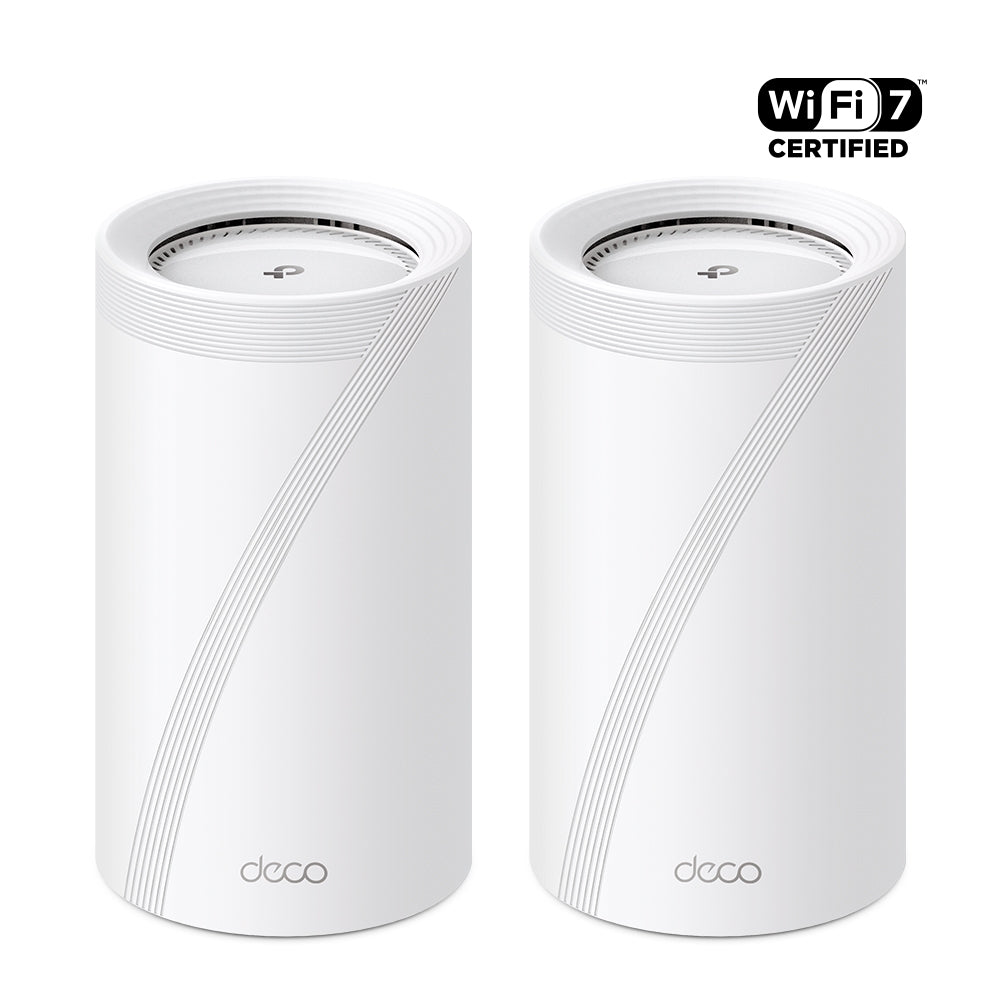
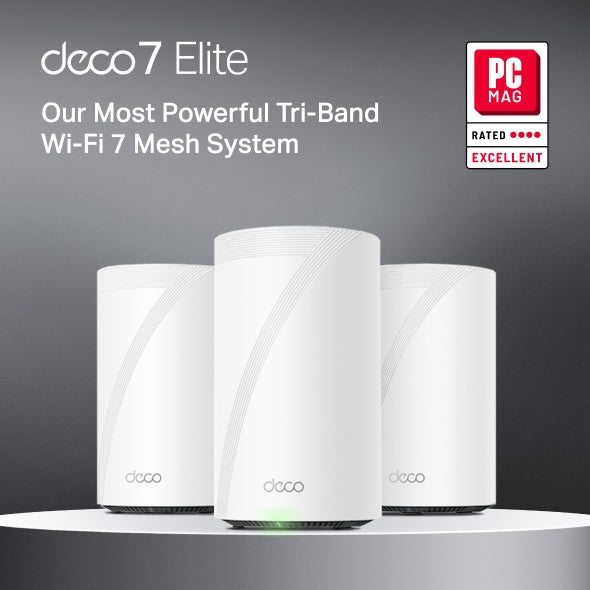
BE22000 Tri-Band Wi-Fi 7 Mesh System | Deco BE85(2-Pack)

2× 10G Ports MLO Multi-Link HomeShield Security 4×4 MU-MIMO
Sale price$1,099.99 Regular price$1,199.99

Tax excluded. Shipping calculated at checkout


  • Ultimate BE22000 Tri-Band Wi-Fi 7 Speeds
  • Pro-Grade Dual 10G & 2.5G Ports
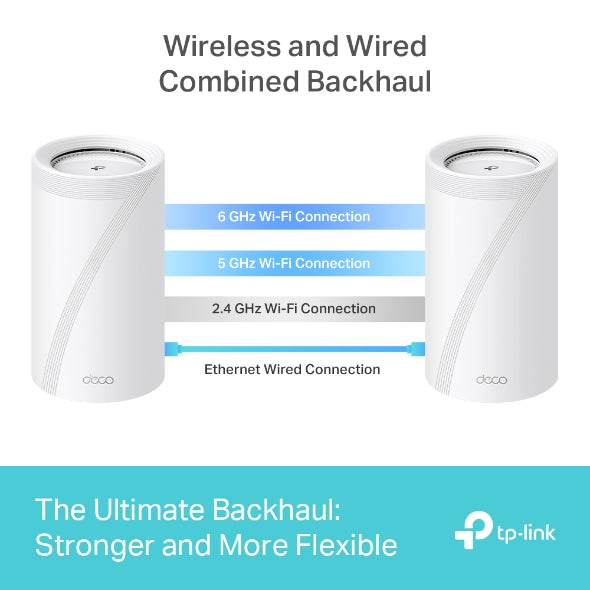
  • Simultaneous Wireless & Wired Backhaul
  • AI-Driven Seamless Roaming
  • TP-Link Home Shield & Support
In stock
🚚 Delivery time: Calculating...
  • Tracking status may only update after the order is processed at the carrier facility.
  • Weekends may affect shipping and delivery.
<p>Earn%20[points_amount]%20when%20completing%20this%20purchase.</p>
Buy now
Secured Shopping
American Express
Apple Pay
Diners Club
Discover
Google Pay
Mastercard
Shop Pay
Visa

Shipping from Canada

  • Free Shipping for Orders Over CAD 200
  • 30-Day No Reason Return Policy
  • Local English/French Customer Service
  • 2 Years Warranty
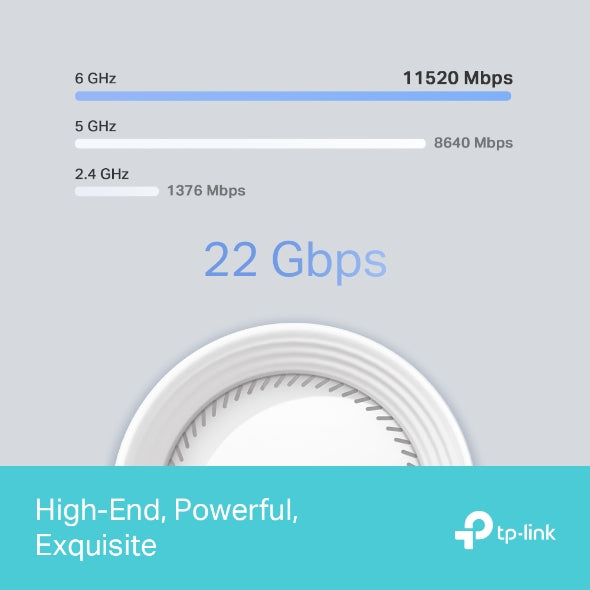
  • Ultimate BE22000 Tri-Band Wi-Fi 7 Speeds: Features 11520 Mbps (6 GHz), 8640 Mbps (5 GHz), and 1376 Mbps (2.4 GHz).
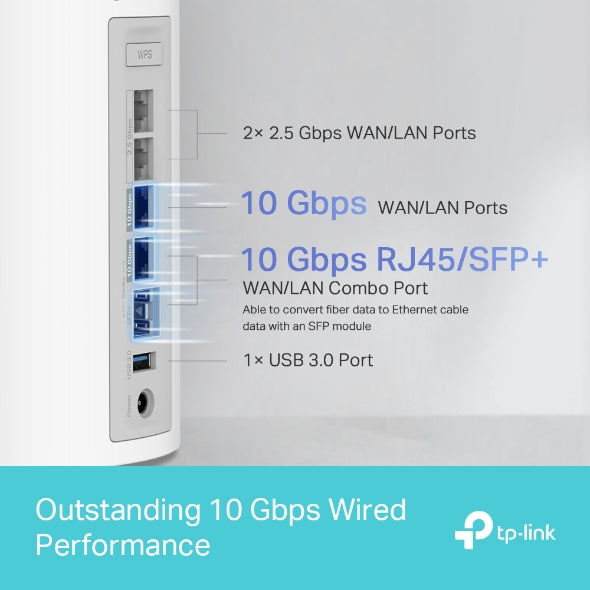
  • Pro-Grade Dual 10G & 2.5G Ports: Equipped with two 10G WAN/LAN ports (one RJ45 and one SFP+ Fibre/RJ45 combo) and two 2.5 Gbps ports.
  • Simultaneous Wireless & Wired Backhaul: Connects wireless and wired backhaul simultaneously using proprietary technology.
  • AI-Driven Seamless Roaming: Forms a unified network with a single name.
  • TP-Link Home Shield & Support: Premium security services keep your network safe with IoT protection, parental controls, and QoS.

WIRELESS

Standards and Protocols Wi-Fi 7
IEEE 802.11be/ax 6 GHz
IEEE 802.11be/ax/ac/n/a 5 GHz
IEEE 802.11be/ax/n/b/g 2.4 GHz
WiFi Speeds BE22000
6 GHz: 11530 Mbps (802.11be)
5 GHz: 8640 Mbps (802.11be)
2.4 GHz: 1376 Mbps (802.11be)
WiFi Range Broader Whole Home Coverage
TP-Link Mesh Technology
Optional Ethernet backhaul work together to link Deco units to provide seamless coverage
AI-Driven Mesh
Intelligently learns the network environment to provide ideal Wi-Fi unique to your home
8× High-Gain Antennas (Internal)
Multiple antennas form a signal-boosting array to cover more directions and large areas
Tri-Band
The greenfield 6 GHz band brings more bandwidth and faster speeds
WiFi Capacity Very High
Tri-Band
Distribute devices to different bands for optimal performance
4×4 MU-MIMO
Simultaneously communicates with multiple MU-MIMO clients
OFDMA
Simultaneously communicates with multiple WiFi 7 clients
12 Streams
More than enough bandwidth for connected devices
Working Modes Router Mode
Access Point Mode
Advanced Features • Multi-Link Operation (MLO)
• 320 MHz Channel
• 4K-QAM
• Multi-RUs
• Works with Alexa and Google Assistant

SECURITY

Network Security SPI Firewall
Access Control
HomeShield Security
Real-Time IoT Protection
Malicious Site Blocker
Intrusion Prevention System
DDoS Attack Prevention
Home Network Scanner
Guest Network 1× 6 GHz Guest Network
1× 5 GHz Guest Network
1× 2.4 GHz Guest Network
Effective Time
Bandwidth Control
VPN Server • OpenVPN Server
• PPTP VPN Server
• L2TP/IPSec VPN Server
VPN Client • OpenVPN Client
• PPTP VPN Client
• L2TP/IPSec VPN Client
WiFi Encryption WPA-Personal
WPA2-Personal
WPA3-Personal

HARDWARE

Ethernet Ports • 1× 10 Gbps
• 1× 10 Gbps SFP+/RJ45 Combo
• 2× 2.5 Gbps
*Per Deco Unit
Supports WAN/LAN auto-sensing
USB Support 1× USB 3.0 Port
FTP Server
Media Server
Samba Server
Buttons 1× Reset Button
1× WPS

SOFTWARE

Advanced Features • Reboot Schedule
• Tapo/Kasa Onboarding
• IoT network & Device Isolation
• Static Route Function
• Node/Band Connection Preference
Protocols IPv4
IPv6
Service Kits HomeShield
Learn More>
Parental Controls HomeShield Parental Controls
Youtube Restriction
SafeSearch
Custom Profiles
Professional Content Filter Library
Family Time
Bedtime
Off Time
Time Rewards
Family Online Time Ranking
Pause the Internet
Weekly and Monthly Reports
WAN Types Dynamic IP
Static IP
PPPoE
PPTP
L2TP
Quality of Service HomeShield QoS
QoS by Device
Cloud Service OTA Firmware Upgrade
TP-Link ID
DDNS
NAT Forwarding Port Forwarding
UPnP
IPTV IGMP Proxy
IGMP Snooping
Bridge
Tag VLAN
DHCP Address Reservation
DHCP Client List
Server
DDNS TP-Link
Management Features Deco App

OTHER

Network Services Enabled by Default Web Server
Manage and configure device through web (HTTP/HTTPS)
• Port: 80/443   Protocol: TCP
DNS
DNS
• Port: 53   Protocol: TCP & UDP
DHCP Server
IP address assignment (DHCP)
• Port: 67   Protocol: UDP
App management
Manage and configure device through app
• Port: 22   Protocol: TCP
• Port: 20001   Protocol: TCP
• Port: 30001   Protocol: TCP
• Port: 20002   Protocol: UDP

PHYSICAL

Dimensions (W×D×H) 5.04 × 5.04 × 9.29 in (128 × 128 × 236 mm)

OTHERS

Certifications CE, FCC, RoHS
Environment Operating Temperature: 0°C~40°C (32 °F~104 °F)
Storage Temperature: -40°C~60°C (-40 °F~140 °F)
Operating Humidity: 10%~90% RH
Storage Humidity: 5%~90% RH
  • 2 Deco BE85 units
  • 1 RJ45 Ethernet cable
  • 2 Power adapters
  • Quick Installation Guide
BE22000 Tri-Band Wi-Fi 7 Mesh System | Deco BE85(2-Pack)
$1,099.99 $1,199.99
Order now

A True Whole Home
Multi-Gigabit Mesh WiFi

BE22000 Whole Home Mesh WiFi 7 System

Deco BE85

wifi7
google home compatible-amazon-alexa HomeShield
wifi7 Certificated

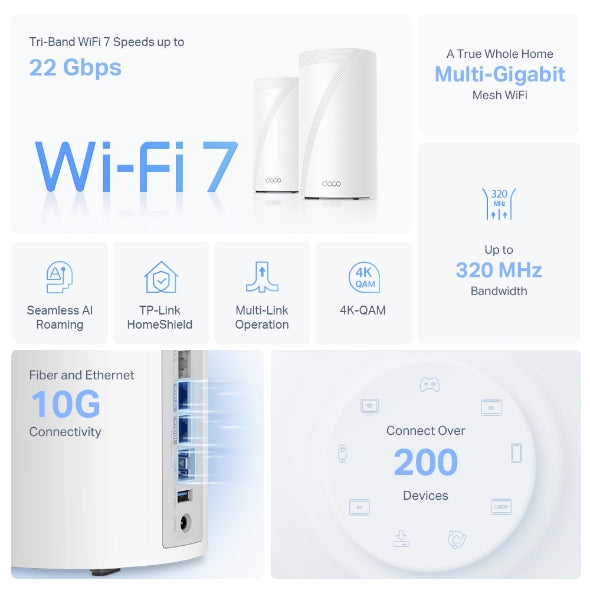
Tri-Band WiFi 7 Speeds up to
22 Gbps

Seamless AI Roaming

TP-Link HomeShield

Multi-Link Operation

4K-QAM

A True Whole Home
Multi-Gigabit
Mesh WiFi

Connect Over
200
Devices

Fiber and Ethernet
10G
Connectivity

Up to
320 MHz
Bandwidth

WiFi 7, WiFi Like Never Before

WiFi 7 offers accelerated throughput, lower latency, stronger anti-jamming, and higher efficiency. Join the league of pros and experience the sheer performance of the next generation of WiFi.

  • Extremely High Throughput

    wifi7
  •  
    Wi-Fi 6
  •  
    Wi-Fi 5
  • 4.2× Faster WiFi

    than WiFi 6E Mesh※

  • 4× Lower Latency

    For Smooth Video and Gaming※※

  • Higher Capacity

    Connects over 200 Devices†

High-End, Powerful, Exquisite

Blazing-Fast WiFi for Top Performance

Experience a high-end Tri-Band Whole Home WiFi 7 Mesh system with blazing-fast WiFi speeds up to 22 Gbps.† Now, every device in your home network will run at top performance. The exclusive 6 GHz band provides exceptional bandwidth and congestion-free channels exclusive to your devices.‡

  • 6 GHz

    11530 Mbps

     
  • 5 GHz


    8647 Mbps

  • 2.4 GHz


    1376 Mbps

22 Gbps

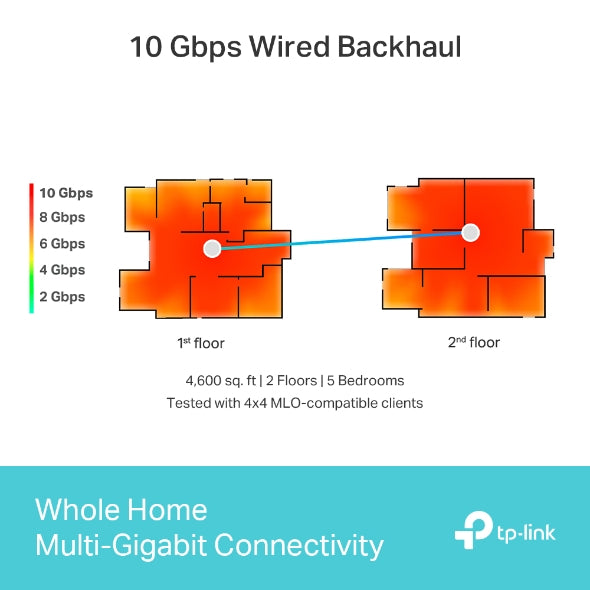
Whole Home Multi-Gigabit Connectivity

Deco BE85 Speed Heatmap

4,600 sq. ft. | 2 Floors | 5 Bedrooms
Tested with 320MHz, 5GHz&6GHz supported, 4×4 MLO-compatible clients

4,600 sq. ft. | 2 Floors | 5 Bedrooms
Tested with 320MHz, 5GHz&6GHz supported, 4×4 MLO-compatible clients

  • arrow 10 Gbps Wired Backhaul

    Every room where a Deco BE85 is located receives 8-9 Gbps of wireless speeds, gradually decreasing with distance. Most of the tested villa clocks in at 7-8 Gbps. Due to a large number of walls, the edge of the home receives around 5-6 Gbps.***

  • arrow Wireless Backhaul

    The 1st-floor Deco BE85 remains the same as with a wired backhaul. But due to the walls and ceiling between the two floors, the center of the other Deco BE85s receives around 4 Gbps with the rest of the house’s speed reaching 3-4 Gbps.***

More speed tests working with cellphones.****

Outstanding 10 Gbps Wired Performance

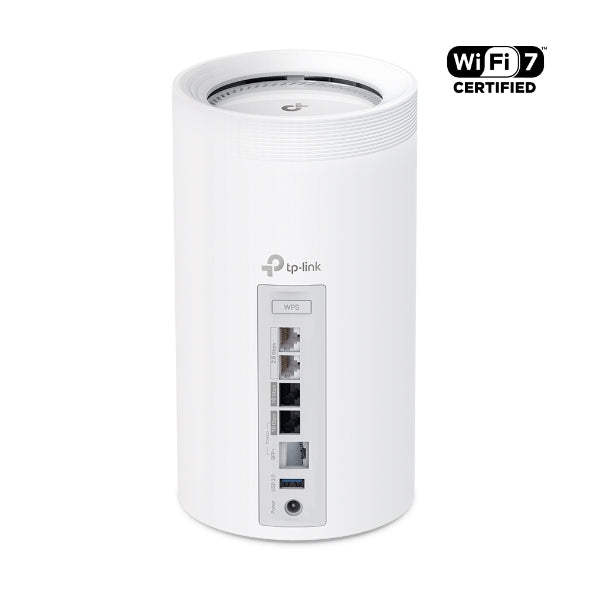
Equipped with two 10 Gbps WAN/LAN ports — one RJ45 port and an RJ45/SFP+ combo port — Deco BE85 provides flexible support for both fiber and copper connections.§ The additional 2.5 Gbps ports and USB 3.0 port make it an ideal solution for future-proofing your home network.

  • 2× 2.5 Gbps WAN/LAN Ports

  • 10 Gbps WAN/LAN Ports

  • 10 Gbps RJ45/SFP+

    WAN/LAN Combo Port

    Able to convert fiber data to Ethernet cable data with an SFP module

  • 1× USB 3.0 Port

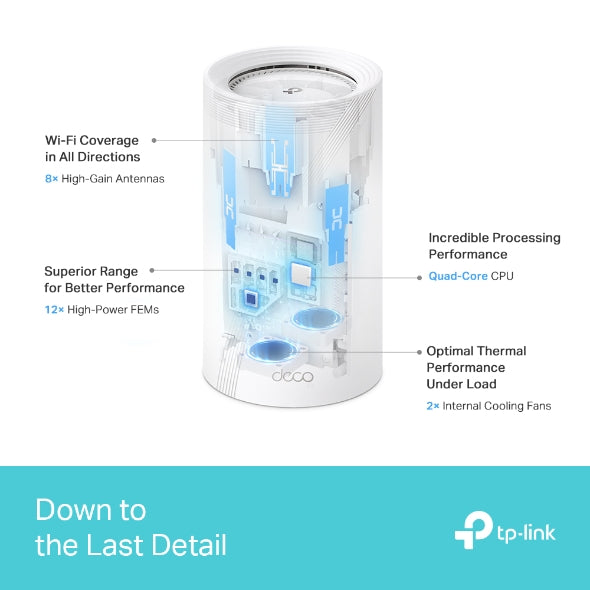
Down to the Last Detail

TP-Link’s in-house component research and thorough hardware selection ensure the quality and value of the entire Deco BE85 system. Everything comes together to form the perfect Mesh device.


Wi-Fi Coverage in All Directions

8× High-Gain Antennas

Incredible Processing Performance

Quad-Core CPU

Superior Range for Better Performance

12× High-Power FEMs

Optimal Thermal Performance Under Load

2× Internal Cooling Fans


The Ultimate Backhaul: Stronger and More Flexible

Through our self-developed technology, Deco BE85 can connect a wireless and wired backhaul with each unit simultaneously. What’s more, with the latest WiFi 7 MLO technology, the system’s wireless and wired combined backhaul aggregation flow rate is increased. This way, it greatly improves overall throughput and reduces latency, delivering broader coverage with more stable and reliable connections.

Wireless and Wired Combined Backhaul

HomeShield

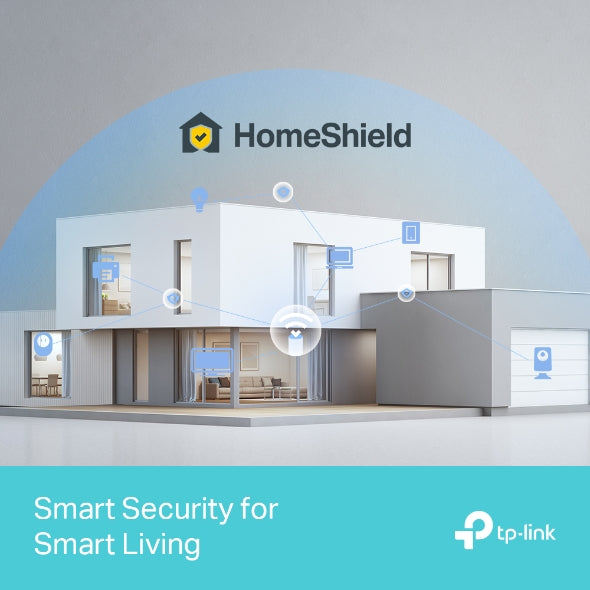
Smart Security for Smart Living

HomeShield provides a series of built-in services that protect all your devices comprehensively with various features for when you’re at home or on the go. With HomeShield, safer internet experiences bring more happiness to your smart living.

  •  

    Network Protection

    Simply configure your gateway and achieve whole home network security. HomeShield examines your network by scanning and identifying potential risks, stopping them in their tracks before they harm your network.*

  •  

    Parental Controls

    Parental Controls protect your kids, while helping them maintain healthy digital habits. Parents can set app blocking, web filtering, YouTube restrictions, SafeSearch, and online time limits to keep kids safe while they’re having fun online.*

  •  

    Maintain Protection Away from Home

    KidShield App

    Devices Security App

    Devices remain secure everywhere with devices security app. And through KidShield, parents can monitor their kids’ locations and set geofencing. This way, kids stay digitally protected even on the go.*

VPN Clients and Server Supported

Allow devices in your home network to access remote VPN servers without needing to install VPN software on every device. You can create different VPN connection types, including OpenVPN, PPTP, L2TP/IPSec VPN. Besides, Deco can run both the VPN and ordinary internet connections at the same time, delivering security and flexibility.


Private IoT Network for More Security

Set up a separate WiFi for IoT devices and overlay HomeShield and advanced WPA3 encryption** to better protect the security of your home network and IoT devices.

Seamless AI-Driven Mesh

Uninterrupted Streaming when Moving Between Rooms

Deco Mesh forms a unified network with a single network name. With built-in AI-Roaming technology, it creates the ideal WiFi solution with its advanced algorithms and self-learning. Walk through your home and enjoy seamless streaming at the fastest possible speeds.‡

  •  

    Seamless Roaming with One WiFi Name

  •  

    Sophisticated Algorithms

  •  

    Seamless AI-Driven Mesh

  •  

    Customized WiFi

More Compatibility,
More Interoperability

With the Matter protocol, Deco works as a central controller to manage all your Matter-certified devices. Matter enables seamless communication among IoT devices across platforms, regardless of their manufacturer. Furthermore, it allows you to access the devices in your local area network (LAN) through the Deco app even when your home goes offline. ◊


Simple. Easy. Yet Powerful.

Setup and manage your network anytime and anywhere on the friendly TP-Link Deco app. In just three easy steps your entire home can be blanketed in strong and reliable WiFi.

  • 1 CONNECT
    to a modem and power on both.

  • 2 DOWNLOAD
    and launch the Deco app.

  • 3 CONFIGURE
    by following the in-app instructions.

Easy Management

Manage your WiFi at home or away on the Deco app. See every connected device, prioritize your own, and set up a guest network.


Voice Control

Use an Amazon Alexa or Google Assistant-enabled device to control Deco BE85 with just your voice.


Alexa Google


All Decos Work Together

Deco BE85 is compatible with every other Deco model to form a Mesh network. Expand Mesh WiFi coverage anytime by adding more Decos.

 
<p>Earn%20[points_amount]%20when%20completing%20this%20purchase.</p>
  • 5 stars: 8 (67%)
  • 4 stars: 4 (33%)
  • 3 stars: 0 (0%)
  • 2 stars: 0 (0%)
  • 1 star: 0 (0%)
K
Ken

The quick rundown is: The house is an approximately 3,500 SF single-level home with many brick-solid doors and twists and turns. The modem is in the center of the house in my office. Wi-Fi without a mesh system would drop off in the back rooms to a crawl.I previously had an ORBI RBS850 for my Cox 1GIG Down / 35 Up plan (they just changed to 100 up before I switched). The ORBI did fine for the last three years I had it. However, even though I would move the satellites around, I would still get reduced speeds in the furthest rooms. Based on ORBI, the RBS850 with two satellites should have been overkill, but it wasn’t.I recently received FIBER and opted for the 1Gig Up/Down. Since the speed is overprovisioned, I’m able to get 1,300 Up/Down. My ORBI was limited to 1 GIG port, so I was limited to around 945 with overhead down and the full upload speeds. Since I do a lot of CAD and video work, I am also considering moving to the 2 or 5-GIG plan in the future.I researched many of the new Wi-Fi 7 mesh systems. Note that I currently do not have any Wi-Fi 7 devices, but I might in the future.I narrowed it down to the new ORBI 970, the Deco BE 95, the Deco BE85, and the Eero Max 7. I chose the Deco BE85 due to its two 10 Gig ports and two 2.5 Gib ports and the price factor.The ORBI was way overpriced, and the BE95 offered me nothing extra. Though the Max 7 was tempting, I ultimately went with the BE85 since I would have wired backhaul on both satellites.My out-of-the-box experience:1. The Deco comes packaged in a very nice, easy-to-open container.2. You are presented with three identical Deco units, three power adapters, and a cord for each that can be removed, making it easier to fish power cords for the Deco.3. I appreciate that the plug-in on the Deco is a normal size and isn’t one of those that take up three or four plug-ins due to its shape/design.4. I already had my BGW320-500 modem set to bridge mode and the ORBI as the router.5. I downloaded the TP-Link APP and started to install the Deco BE85 Mesh system.6. The app asked me to scan the bottom of one of the Decos (it didn’t matter which, as it would become the main).7. The app did not list a BE85. Maybe it is listed as a BE2200? Nope.8. I then continue to install but choose Install MANUALLY.9. I turn off my printers (you will really want to do that)10. Unplug my BGW320-500 Fiber Modem.11. I disconnected from all of the ORBIs.12. I take a photo of the bottom of the Deco I choose to be the Main so I can add the MAC Address13. I then connect to Deco’s Wi-Fi through my phone.14. It then tells me that the Deco I chose doesn’t match the one I’m installing. ( I KNOW THAT.)15. It asks me if I want to change it to the BE85. Of course I do. I say yes and click Next.16. It tells me to connect the Fiber Ethernet to my Deco and then to my Switch.17. I connect to the top 10G port on the Deco and then to the switch on the bottom 10G port of the Deco.18. Since I have a switch with two 10G ports and 6 2.5 G Ports, I connect all the drops to my other rooms to my switch.19. Deco warns me that only one 10G port can be used and that the bottom is a combo port. For a second, I thought, why give me two ports if I can only use one? Then, it dawned on me that the warning was poorly written. What they mean is you can use the bottom port as a 10G ethernet port by taking out the plug and using the bottom SFP+ port (if needed), but you can’t use both at the same time.20. I then placed my first Deco satellite Unit in Room 1, connected the wired ethernet drop to the top 10Gport, and connected the lower 10G port to my Switch in Room 2.21. I then plug in the first Deco Satellite, and it connects almost immediately.22. I do the same thing for Room 2, connecting it the same way as Room 1.23. I then change the SSID to match my old SSID and password Exactly.24. Make note that both are case-sensitive.25. It takes it, and Now I don’t have to change all my Wi-Fi log-ins on 50+ devices.26. Before I started, I had an Excel spreadsheet with all my devices' MAC addresses. You should do the same if you can.27. I looked at the Deco app on my iPhone and noticed that most of the devices did not have very good descriptions. I simply went into the app, looked at the connected MAC address, referenced it with my spreadsheet, and copied the name from my spreadsheet into the Deco app. (Note that I had the spreadsheet on Dropbox, so I was able to copy from my iPhone to the Deco app without typing them all out.28. In about 10 minutes, I had all my devices with good descriptions.29. I then noticed that there was a section for devices that were not currently online, like TVs, PS5s, etc. I changed the names of these devices, too.30. I checked everything out and noticed the 6Gz channel had my SSID followed by _6Ghz, I do have some phones that are 6Ghz so I went in and changed the SSID to match my other SSID by removing the _6Ghz at the end of the name.31. My phones were not connecting to the 6Ghz.32. I then found...

T
Trevor K Smith

The TP-Link Deco BE85 (BE22000) Tri-Band WiFi 7 Whole Home Mesh System is designed for users demanding ultra-fast, seamless internet across large areas, making it ideal for multi-device households. Featuring next-gen WiFi 7 technology, it offers unprecedented speeds of up to 22 Gbps through its tri-band setup (6 GHz, 5 GHz, and 2.4 GHz), perfect for high-definition streaming, gaming, and smart home devices.### Key Highlights:- **Exceptional Speed**: With combined wireless speeds of up to 22 Gbps, the Deco BE85 leverages the new WiFi 7 technology. This includes 11520 Mbps on the 6 GHz band, ensuring congestion-free performance, especially useful for heavy internet activities such as 4K/8K streaming or virtual reality gaming.- **Wide Coverage**: The system covers up to 9,600 square feet, making it suitable for large homes or multi-story buildings. With seamless AI-Roaming, devices are automatically connected to the best signal as you move throughout the house, ensuring consistent performance.- **10G Multi-Gigabit Ports**: Equipped with two 10 Gbps WAN/LAN ports (including a flexible RJ45/SFP+ combo), along with two additional 2.5G ports, this system is ready for multi-gig internet connections, eliminating bottlenecks and future-proofing your network.- **Mesh Flexibility**: Supports up to 200 connected devices without compromising speed, thanks to the tri-band configuration and Multi-Link Operation (MLO), which optimizes simultaneous data streams across different bands to reduce latency.- **Advanced Security and Controls**: TP-Link HomeShield provides strong security with WPA3 encryption, cyber threat prevention, parental controls, and detailed usage reports, ensuring your network and devices stay protected from online threats.- **Easy Setup**: The Deco app allows for quick setup and easy network management. It’s also compatible with Amazon Alexa and Google Assistant, giving you voice control over your network.This system is a top choice for tech enthusiasts who need reliable, high-speed internet for a large number of devices and future-proofing their home network.

B
Bichon Mom

TP-Link Tri-Band, Deco BE85, WiFi 7 BE22000 Whole Home Mesh System was a purchase that I debated about and researched well. I am happy with it but will mention one picky issue.Once I upgraded from 1.2 Gbps Xfinity cable internet to 8 Gig fiber optic, I also wanted to upgrade my mesh router. I was using the Google Nest Pro WIFI 6e mesh router and was happy with it but the ethernet ports on it were only 1GB and I wanted to take advantage of my newer higher speeds. I knew that I wanted another mesh system and definitely a WIFI 7 one.There were several options but, years ago, I had the TP-link OnHub router which was the first router that never gave me any problems. I decided to stick with the tried and true and then debated between this system and the BE95. Although I have a phone and a laptop that are WIFI 7, most of my other devices are WIFI 6e or lower so I realized that the BE95 would exceed my needs for many years. I got the three pack of the BE85 since I have a large two story home with smart devices in the front and back yards as well as the garage. I’m glad that I did because the three units give me complete coverage everywhere.Each of the three routers are the same so any of them can be selected to be the main router. I like this because it means that if the main one ever malfunctions, I can easily switch and not be without internet. They all have 4 multi-gigabit ethernet ports. I have three of my older devices on ethernet and the speed up and down is over a gigabit on each. The WIFI 7 phone and laptop routinely have over 1.5 Gb up and down wireless speeds.The installation was as easy as expected with the Deco app. The app was updated a couple of weeks after I got this system and version 3.7.14 works very well. I have a SmartHome with a lot of different devices and this app makes it so easy with a menu option to set up an IOT (Internet of Things) for those devices that work exclusively on the 2.4ghz network. It also features a network optimization selection which scans the network looking for any areas of interference. One can give a device priority and even choose a dedicated band and router for connection. I get all the information that I need easily without any monthly fee.The only bit of complaint that I have is the power plugs. At first I thought that I might have a defective router until I noticed that the power plug green light was not on. Maybe it had to do with how tightly they were wrapped but, at first, all the power plugs were so touchy that a slight bump could turn off the green light and power. I’m not taking any stars off for that since they are working well now but also they are not in an area where they get bumped very often.I am very happy with this purchase. The system is stable and connections hold well. The speeds compared to my old WIFI 6e system are so much better. I do recommend this to anyone who has a multi-gigabit internet service.

M
Mitch G.

3rd update after 19 months:I am updating this again as the support team at TP-Link is just outstanding. I jumped through hoops to get my network reasonably stable adding more mesh units and changing out devices and eventually got it reasonably stable. TP-Link support spent a lot of time reviewing logs and providing me updated firmware. Eventually I got to a point where the 4-6 device dropouts were acceptable. Never did the TP-Link support group give up on my concerns when I reached out to them. I am updating this now as it has been 19 months since I installed the BE85s and I made the mistake of updating to the new firmware hoping that they had incorporated all my custom changes and new security updates. This was a mistake and the network went very unstable. I then found I couldn't go back to my old firmware. I reached out to the TP-Link group asking for help even though it was at the time 18 months since I purchased and I felt they could wash their hands of it. They did not and quickly worked with me to restore the old firmware. During this process I discovered that with my old firmware I could run just the two BE85s and my network was pretty rock solid. Apparently the additional nodes caused more issues than they helped and the custom firmware with just the two BE85s. The only downside is I had Very fast wired speeds in my office to one of the XE75s, around a 1GB downloads speeds. With just the wireless to my Mac it's around 500mb which is still good. I thanked the team and decided I would try to sell the XE75s and they offered a few options to help me still use them. So all said and done I have 180+ wifi devices running on two BE85s and it is now pretty stable. Between the routers performance which is super fast and now stable and the TP-link team I am adjusting my review. I hate that I spent so much time fighting all this to get here but I have to commend the team for sticking with it.2nd update after 4 months:Revised after excellent customer support:TP-Link support contacted me as a result of my initial review and have steadily worked through my issues with this router. A firmware update has fixed the wireguard vpn connection along with steady back and forth troubleshooting to make the client and server vpn connections rock solid. The initial disconnect issues have resolved after the firmware update and the device connection list has improved. It is not to the point that I expect as I still have devices that do not show in the connected list but are online but it is significantly improved over how it was to start with. The support team is actively working that issue with me.This router is now performing as I expect and I am very pleased with the excellent customer support provided. I have update my overall rating to reflect the support and current performance.Original review:When I first set up this router with one mesh node it was blazing fast. After a little over 2 weeks installed the wireless speeds around the house have been halved. I have around 120 wireless devices and at any given time the Deco app only shows 60-80 connected even though most of them are verified connected. At the same time devices constantly disconnect and reconnect. This router replaced an ASUS AX11000 which constantly maintained the 120+ device connections.

M
Mr. Seeking Quality Goods

Installed 5 of these in a large house where WiFi demand was high in parameter rooms and opposite corners. Usage includes gaming PC’s, numerous TV’s streaming, Office laptops, numerous iPads and iPhones, etc. Even installed one in my garage near the driveway so I get coverage there and in the front yard. Coverage has been outstanding. My internet speeds tests have been blazing fast in every part of the house. Signal strength has been very strong. The app gives great visibility into which client devices are connected into which Ecco unit. And, connect preferences can be tailored. I use the app much more than I ever imaged I would to check on things and it is really easy to use and well thought out. I must say the whole system has been fantastic and exceeded my expectations. The units operate dead quiet. When initially setting up, I did have some questions and contacted support who easy to get a hold of and were very helpful. Needless to say, I love this system!

M
Mohammed
جهاز ممتاز لكن الوصف يحتاج تصحيح

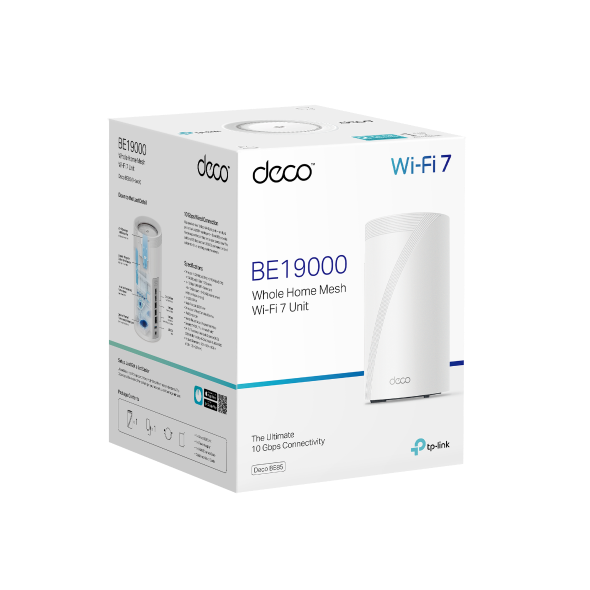
الجهاز ممتاز من ناحية الأداء، الثبات، وسهولة الإعداد.لكن المنتج مُعلن كـ BE22000، بينما الجهاز الذي وصلني مكتوب على العلبة BE19000.لا يوجد فرق واضح في الاستخدام اليومي، لكن وصف السرعة لا يطابق النسخة الفعلية.يفضّل تصحيح الوصف لتجنب اللبس للمشترين.

M
Misael RF
Velocidad garantizada

Este fue el primer set de routers que me permitió tener internet de alta velocidad en mi casa de 2 pisos. Probé otros routers de la misma marca y no tienen la misma potencia que este. Excelente producto!

P
Pete_RHR
VALE CADA CENTAVO!!! Tecnología de punta, velocidad superior -ningún otro producto ofrece

Es un producto realmente impresionante. Mi conexión a Internet es por 700Megas ahora simétrico. MI casa es de 110m cuadrados, pero tenía un WIFI-PowerExtender puesto que la señal inalambrica del modem no llegaba hasta las recamaras al fondo de la casa alrrededor de unos 10-15 metros del router principal y con más de 3 paredes entre ellos. El Wifi PowerExtedner (solución anterior) solo me daba 20 a 26 Megas en las recamaras de atrás como mucho y los aparatos WIFI allá tenian muchas desconexiones, era frustrante. Tiré ese sistema a la basura y puse dos antenas DECO BE22000 y tengo 700MB completos en ambas recamaras atrás y 700 completos en el estudio. Es verdaderamente impresionante que el Streaming e incluso el Playstation de la recamara funcionan como si estuvieran conectados directos por cable al router de salida. RECOMENDADO AMPLIAMENTE!

C
CHRJAMBAR
Fantastic connection and Ethernet options

ProsVery easy to setupEthernet ports available to use even in extender modeAnaheim advanced customization settingsDead quietNice lookingConsAdvanced features require a subscription which should be included at this priceNotesIt will disconnect often and cause all kinds of havoc if you increase the width of the 5ghz channel. Turning this off resolves all the issues but the system should be able to notice this on its own and recommend it (I would run the wifi interference scan and the unit would identify congestion and change channels which didn’t help but it never recommended reducing the lanes)RequestI would sacrifice a port to include MOCA for homes without ethernet to improve the range options for the units from each other. Mine are line of sight 20’ apart with 6ghz dedicated to back haul so I have no issues but if you’re trying to push through walls using 6ghz you will encounter huge speed drops.

L
LuckyLucy
A worthy upgrade to existing deco network, as main node

TP-Link Deco BE22000 Tri-Band WiFi 7 Mesh System (Deco BE85) - 12-Stream 22 Gbps, 2× 10G + 2× 2.5G Ports Wired Backhaul, 8× High-Gain Antennas, VPN, AI-Roaming, 4×4 MU-MIMO, HomeShield (1-Pack)This is a pretty beefy WiFi node. It's double the size of the older WiFi 6e Xe75 NODE units.There's a tonne of reviews out there. So I'm going to offer my thoughts for my deco mesh upgradeI have 8 Indoor xe75 and 3 outdoor x50s in my mesh. One main xe75 malfunctioned in a brownout so I needed to replace it. Luckily it still boots up but for whatever reason it was ultra flakey.I briskly bought this newer be85 as a main node replacement. Deco app allows you to do a "replace main" node procedure. It basically takes you thru a series of boot ups and configuration transfers and then ultimately it makes you swap the Ethernet cables form old deco to new be85. This process was not smooth. The config transfer failed a couple times for whatever reason, but tirs times a charm. It worked!! My entire router setup including vlan and isp login worked flawlessly once the transfer was a success.. I was able to keep all my existing satellites and just swap this main node . Very happy ! Otherwise it means I need to make a new network and re-add all the satellites, very time consuming processThat out of the way my network is humming really well. Able to get full 800mbps from my fiber optic Internet wired. WiFi wise , I get around 500mbps. I setup the MLO wifi (basically carrier aggregation with 5 and 6 ghz bands) and this works however I found it Slower than just 6ghz. With MLO ssid I get around 400mbps. (Tested in same location with my pixel 9 XL pro WiFi support). I'm not sure why MLO is slower. But what MLO offers is a stabler setting with multi band support. I'm happy to have it but likely not going to use it much.With such a complex network I find things seem to work better with this be85. It's likely because the CPU cores are much faster. Things seem to run quicker on my network. File transfers quicker inler load , network reboots make satellites reconnect really really fast compared to older xe75, and oddly enough my 2ghz iot devices seems to drop less and keep stable.Even if you're not needing wifi 7, this is actually a worthy networking upgrade due to the speed of things , in a complex mesh network. I'm very happy to have upgraded to this be85 rather than buy yet another xe75 replacement main node. The 2.5g Ethernet is a nice future proofing . Met network is just 1gbps so I can't take advantage of that .So if there are any folks out there who have similar large mesh network with decos , I recommend buying this newer gen be85 unit to be your one main node whilst keeping your other xe75's or x60's as satellitesSince the time of review , I have bought a be65 WiFi node to replace my busiest satellite node. The extra processing power for be65/85 series is a notificible enough ugorade. It really is that good.

R
Robert Y.
Great

Turned out great.

Z
Zeke
This works. Good compared to others, especially if you already own a DECO.

This solved my problem with dropout. Unfortunately as a previous owner of 3 Xe75 units having to buy this to update the software was a bit of an issue since I didn't know it would solve my issue or should I go to a different brand? It turned out that this solved my issue with now over 100 Device on and no drop outs. I made The two BE85 the primary and used 2 of the Xe 75 in the MESH. The reason I give it 4 stars is that they could have just updated my old model of Deco to fix it. But I understand they have to make money.
